Managing one WordPress website is relatively straightforward. Managing 10, 50, or 100+ client websites is a different challenge entirely. Agencies need to deploy sites quickly, keep every environment secure and updated, monitor performance, maintain reliable backups, and give clients the right level of access—all without turning routine maintenance into hours of manual work.
As the number of client sites grows, the hosting platform becomes part of the agency's operational workflow. A good agency hosting solution should make it easy to manage multiple sites from one place, clone and stage websites, automate backups and updates, isolate sites, monitor performance, and scale infrastructure when workloads increase.
That's why price alone isn't enough when comparing managed WordPress hosting for agencies. A cheaper plan can become expensive in staff time if basic tasks require manual server management, while a higher-priced platform may deliver better value through automation and centralized management.
In this guide, we'll compare the best managed WordPress hosting options for agencies based on multi-site management, performance, security, backups, staging, cloning, monitoring, client access, server control, cloud flexibility, scalability, and overall agency workflow.
What Makes WordPress Hosting Good for Agencies?
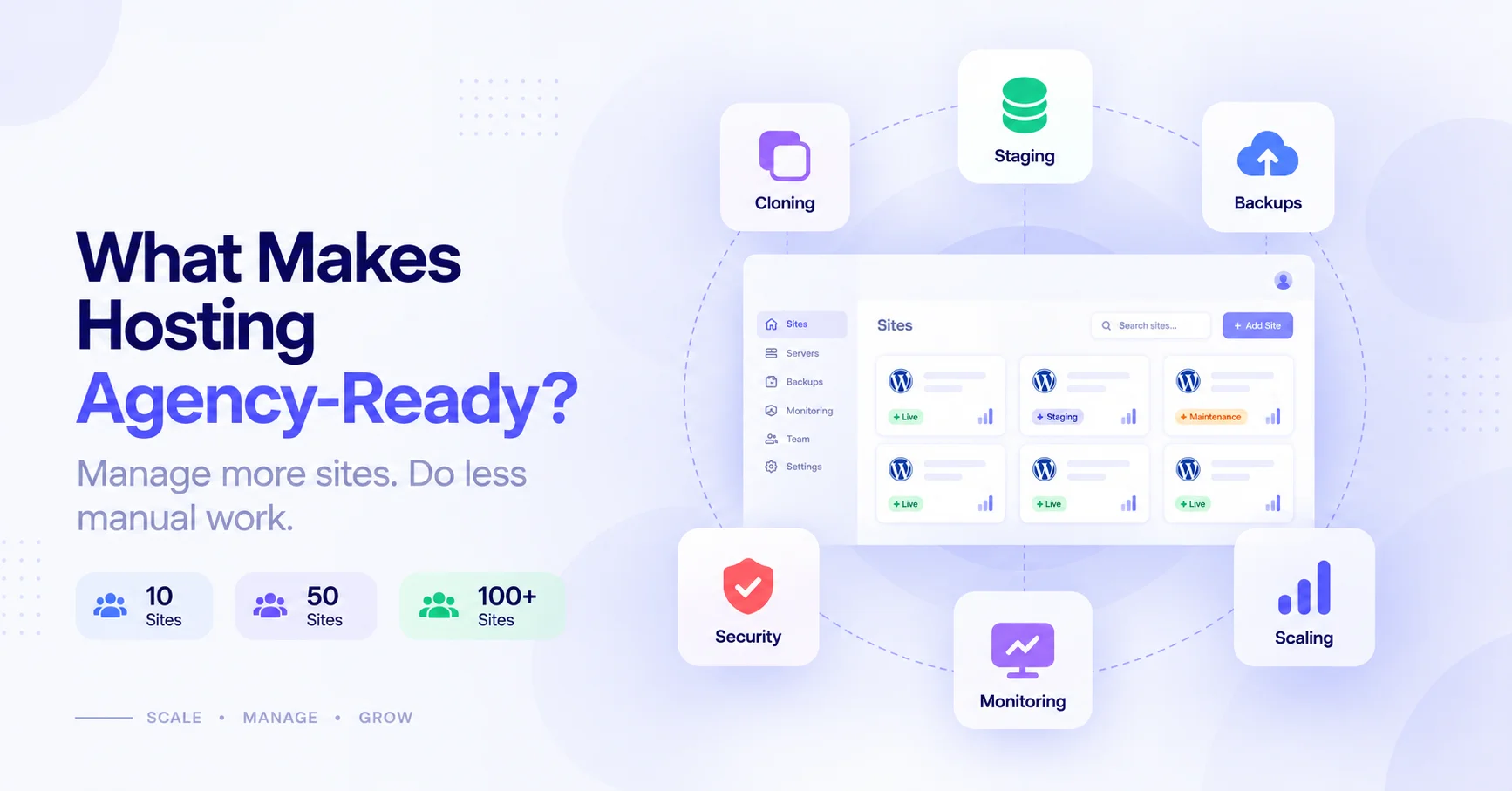
The best WordPress hosting for agencies combines centralized site management, strong performance, reliable security, automation, and flexible infrastructure. It should make it easy to manage multiple client websites, deploy and test changes, protect sites, monitor performance, and scale resources without increasing operational complexity.
Multiple Site Management
Agencies need to manage many WordPress websites from a centralized environment. A unified dashboard can reduce repetitive tasks and make it easier to monitor and maintain client sites at scale.
Site Isolation
Each client website should be isolated from others so that resource issues, configuration problems, or security incidents on one site are less likely to affect other sites on the same infrastructure.
Cloning
One-click cloning makes it faster to create new client projects, duplicate existing websites, or create development environments without rebuilding a site manually.
Staging
Staging environments allow agencies to test WordPress, plugin, theme, and configuration changes before applying them to a live client website.
Backups
Automated and reliable backups protect client websites against accidental changes, failed updates, security incidents, and other operational problems. Agencies should also consider how quickly backups can be restored.
Updates
Centralized WordPress, plugin, and theme management can save significant time when an agency maintains dozens of websites. The ability to control and monitor updates is particularly valuable at scale.
Monitoring
Agencies need visibility into uptime, performance, server resources, and potential issues across their client portfolio. Monitoring helps teams identify problems before they become client-facing incidents.
Security
Agency hosting should provide multiple layers of protection, including SSL, firewalls, malware protection, secure authentication, server hardening, and site isolation.
Client Access
Agencies often need to give clients access without giving them complete control over the underlying infrastructure. Granular permissions and separate user roles can help agencies maintain that balance.
Server Control
As client websites become more demanding, agencies may need control over PHP versions, web servers, caching, databases, server resources, and other infrastructure settings.
Scalability
The hosting platform should accommodate growth—from a handful of websites to dozens or hundreds—while allowing resources to increase as traffic and workloads grow.
Performance
High-performance agency hosting should support technologies such as page caching, object caching with Redis, optimized PHP, modern web servers, CDN integration, and sufficient CPU, RAM, and storage resources.
Ultimately, good agency hosting isn't just about keeping websites online. It's about giving an agency the tools and infrastructure needed to operate an entire portfolio of WordPress websites efficiently and reliably.
What Should Agencies Look for in High-Performance WordPress Hosting?
High-performance WordPress hosting for agencies should provide a fast web server, multiple caching layers, optimized PHP and database processing, and resources that can scale with traffic. These capabilities help agencies maintain fast, reliable client websites while handling growing traffic and increasingly demanding WordPress workloads.
Fast Web Server
The web server handles incoming requests and delivers WordPress content to visitors, so its configuration can have a significant impact on response times.
Nginx
Nginx is widely used for high-traffic WordPress environments because of its efficient request handling and ability to serve static content with low overhead. It also works well with FastCGI caching and modern HTTP protocols.
OpenLiteSpeed
OpenLiteSpeed is another performance-focused web server that works particularly well with WordPress and caching technologies such as LiteSpeed Cache. It can be a strong choice for agencies looking for server-level caching capabilities.
Apache
Apache remains a widely supported WordPress web server with a mature ecosystem and extensive configuration flexibility. It can deliver strong performance when properly configured, although the optimal choice depends on the site's workload and hosting architecture.
For agencies, the important consideration isn't simply which web server is fastest in isolation, but how well the server, PHP, caching, database, and infrastructure work together. Our comparison of OpenLiteSpeed vs Nginx vs Apache goes deeper on that choice.
Page and Object Caching
Caching reduces the amount of work required to generate WordPress responses. A high-performance hosting environment should support multiple caching layers.
Page Caching
Page caching stores generated HTML so repeat requests can often be served without re-executing WordPress and PHP. This can significantly reduce server processing for cacheable pages.
Redis Object Caching
Redis stores frequently accessed WordPress objects in memory, reducing repeated database queries. It's particularly useful for dynamic websites, WooCommerce stores, membership sites, and other workloads where full-page caching is limited.
FastCGI Caching
FastCGI caching can store generated responses at the web-server level, allowing subsequent requests to be served without sending every request through PHP.
CDN Compatibility
A CDN can distribute static assets such as images, CSS, JavaScript, and other files through geographically distributed edge servers. For agencies managing clients in different regions, CDN compatibility can help reduce latency and improve asset delivery.
The strongest setups often combine these technologies rather than relying on a single caching layer:
CDN ↓Page / FastCGI Cache ↓PHP / WordPress ↓Redis Object Cache ↓MySQLPHP and Database Optimization
WordPress performance also depends heavily on how efficiently PHP processes requests and how quickly the database can execute queries.
PHP Versions
Using a supported, modern PHP version can provide performance, security, and compatibility benefits. Agencies should have the ability to select and upgrade PHP versions as client websites evolve.
PHP-FPM
PHP-FPM (FastCGI Process Manager) manages PHP worker processes and can be configured to handle concurrent WordPress requests efficiently. Proper worker configuration becomes increasingly important as traffic and the number of hosted sites grow.
OPcache
OPcache stores compiled PHP bytecode in shared memory, reducing the need for PHP to compile scripts repeatedly. It is an important part of a well-optimized WordPress PHP stack.
Database Performance
Even with strong caching, WordPress eventually needs to communicate with its database for many requests. Agencies should consider database performance, query efficiency, available resources, indexing, and database configuration when evaluating hosting.
A fast server cannot compensate indefinitely for an inefficient database or poorly optimized WordPress application.
Resource Scalability
Agency workloads can change significantly between clients and over time. Hosting should provide enough resources to handle normal workloads while offering a clear path to scale when traffic increases.
CPU
CPU resources affect PHP execution, database processing, background tasks, and other server workloads. Resource-intensive client sites may require additional CPU capacity.
RAM
RAM is particularly important for WordPress servers running multiple sites, PHP workers, databases, Redis, and other services simultaneously. Insufficient memory can lead to swapping and degraded performance.
Storage
Fast storage affects database operations, file access, backups, and other disk-intensive tasks. Agencies should also consider storage capacity as their client portfolio grows.
Traffic Spikes
A client campaign, product launch, viral post, or seasonal event can suddenly increase traffic. Hosting should have enough headroom—or a clear scaling mechanism—to handle temporary increases without bringing the site down.
Vertical Scaling
Vertical scaling means increasing the CPU, RAM, or other resources available to an existing server. This can be useful when a growing client website outgrows its current infrastructure without requiring an immediate migration to a completely different environment.
For agencies, the ideal setup combines efficient caching and application optimization with infrastructure that can scale when those optimizations are no longer enough.
Essential Features for Agency WordPress Hosting
When comparing WordPress hosting for agencies, features should be evaluated based on their impact on day-to-day operations, client management, website reliability, and scalability. A platform that saves minutes on every site can save an agency many hours as its client portfolio grows.
| Feature | Why Agencies Need It |
|---|---|
| Site cloning | Launch client projects faster and replicate existing configurations |
| Staging | Test updates and changes safely before pushing them live |
| Automated backups | Reduce operational risk and simplify website recovery |
| Site isolation | Prevent problems on one client site from affecting others |
| Centralized updates | Manage WordPress, plugins, and themes across many sites |
| Monitoring | Detect downtime, performance issues, and resource problems early |
| Redis | Improve dynamic performance and reduce repeated database queries |
| Server control | Handle growing workloads and customize infrastructure when needed |
| BYOS | Choose preferred cloud infrastructure while retaining centralized management |
These features become increasingly important as an agency moves from managing a few websites to dozens or hundreds of client sites. The right platform should reduce repetitive work while giving your team enough control to handle more demanding projects.
Best Managed WordPress Hosting for Agencies
Choosing the right managed WordPress hosting for an agency requires looking beyond monthly pricing and basic server specifications. A platform that works well for one website may become inefficient when an agency needs to manage dozens of client sites, multiple environments, and different infrastructure requirements.
For this comparison, we evaluate each hosting provider against the features that matter most to agencies:
- Multi-site management — How efficiently can an agency manage multiple WordPress websites from one platform?
- Performance — Does the infrastructure provide fast servers, caching, optimized PHP, and reliable database performance?
- Security — What protections are available for websites, servers, accounts, and client data?
- Backups — Are backups automated, reliable, and easy to restore?
- Staging and cloning — Can agencies quickly create staging environments and duplicate existing websites?
- Client management — Can agencies provide clients with appropriate access without exposing unnecessary infrastructure controls?
- Server control — How much control does the agency have over PHP, caching, server configuration, and other infrastructure?
- Scalability — Can the platform handle growth in both website traffic and the number of managed client sites?
- Cloud flexibility — Can agencies choose their preferred cloud provider or infrastructure?
- Pricing and value — Does the overall cost make sense when considering features, resources, operational efficiency, and the number of sites an agency manages?
We use these criteria to compare the platforms based on real agency workflows, rather than simply ranking them by price or the number of features on their product pages.
The result is a practical comparison for agencies deciding whether they need a fully managed WordPress platform, greater server-level control, cloud flexibility, or a combination of all three.
1. FlyWP — Best for Managed WordPress Operations With Infrastructure Control
Best for agencies that want managed WordPress operations with greater infrastructure control.
FlyWP combines centralized WordPress management with Docker-powered infrastructure, giving agencies an alternative to traditional managed hosting and fully self-managed servers. It supports both managed hosting and BYOS (Bring Your Own Server), allowing agencies to choose between convenience and greater control over their infrastructure.
For agencies managing multiple client websites, FlyWP brings day-to-day WordPress and server management into a centralized platform. Its feature set includes Docker-based site isolation, one-click cloning, staging, backups, Redis, monitoring, security controls, server management, and developer-focused workflows.
Why Agencies Choose FlyWP
The value of FlyWP becomes more apparent as an agency's website portfolio grows.
Managing 10 sites:
At this stage, agencies can still manage many tasks manually, but centralized site management, cloning, staging, backups, and monitoring can eliminate repetitive work and make routine maintenance more consistent.
Managing 50 sites:
Manual management becomes significantly harder to maintain. Agencies need stronger automation, centralized monitoring, reliable backups, site isolation, and efficient deployment workflows to avoid spending excessive time maintaining individual websites.
Managing 100+ sites:
At this scale, infrastructure management becomes an operational challenge of its own. Docker-based site isolation, centralized management, scalable server resources, monitoring, automated workflows, and the ability to choose appropriate cloud infrastructure become increasingly important.
FlyWP's approach is designed around this progression: manage WordPress sites centrally while retaining more control over the underlying infrastructure than traditional managed hosting typically provides.
FlyWP Pros & Cons
Pros
- Centralized management for multiple WordPress sites
- Docker-based site isolation
- One-click cloning and staging workflows
- Automated backup capabilities
- Redis and caching support
- Server-level security and management tools
- Managed hosting option for teams that don't want to provision infrastructure themselves
- BYOS option for agencies that want to use their preferred cloud server
- Greater infrastructure control than many traditional managed WordPress platforms
- Developer-friendly tools and workflows
Cons
- The additional infrastructure control can introduce more complexity than a fully managed WordPress platform.
- BYOS is better suited to agencies comfortable with cloud servers and infrastructure concepts.
- Agencies looking for a completely hands-off hosting experience may prefer a more traditional managed WordPress provider.
- The best setup depends on the agency's preferred cloud infrastructure, workload, and technical expertise.
2. WP Engine — Best for Enterprise-Grade Managed WordPress
Best for agencies and enterprise teams that prioritize managed infrastructure, performance, security, and mature client-management workflows.
WP Engine is a well-established managed WordPress platform with dedicated agency and enterprise offerings. Its platform is designed to reduce infrastructure and maintenance work while giving agencies centralized tools for managing multiple client websites and development environments.
Managed WordPress
WP Engine handles much of the underlying hosting and platform maintenance, allowing agencies to spend less time managing server infrastructure. Its agency platform also provides a unified dashboard for managing multiple sites and accounts.
Performance
WP Engine uses its EverCache technology and performance-focused infrastructure to improve WordPress delivery. Its agency platform also provides site-performance monitoring, while higher-end workloads can be supported through specialized infrastructure.
Staging and Development
Each WP Engine site can have separate Production, Staging, and Development environments. These environments operate independently, allowing agencies to test changes without directly affecting production.
Backups
WP Engine provides automated platform-level maintenance and backup capabilities as part of its managed WordPress environment, reducing the amount of infrastructure maintenance agencies need to handle themselves.
Security
Security is a major part of WP Engine's positioning. Its agency platform includes Global Edge Security, managed WAF capabilities, DDoS mitigation, bot management, and proactive monitoring, with additional security and resilience options available for higher-end environments.
Agency Capabilities
WP Engine has a dedicated agency ecosystem built around managing larger client portfolios. Agencies can use its All Accounts View, white-labeled reporting, site monitoring, bulk management capabilities, partner program, and flexible client billing options.
The platform also highlights agencies managing hundreds or even thousands of client websites; for example, WP Engine reports that one agency partner manages more than 1,000 client sites.
Enterprise Features
For organizations with more demanding requirements, WP Engine offers enterprise-focused infrastructure, performance monitoring, security, expert support, and architectural guidance. This makes it particularly relevant for agencies serving large businesses or managing business-critical WordPress projects.
Limitations and Control Considerations
The main tradeoff is infrastructure control. WP Engine is designed around a managed platform, so agencies that want to configure their own cloud servers, choose their underlying infrastructure, or manage Docker-based server architecture may find it less flexible than a BYOS-oriented platform.
It can also be a premium option, so agencies should evaluate the total cost of ownership against the amount of maintenance, support, security, and operational work the platform removes.
Best suited for: Agencies that prioritize mature managed WordPress infrastructure, strong security, centralized client management, and enterprise-grade support over granular control of the underlying server environment.
3. Kinsta — Best for Premium Managed WordPress
Best for agencies that prioritize premium performance, managed infrastructure, security, and polished client-site management.
Kinsta runs its WordPress platform on Google Cloud infrastructure and isolates each site in its own container with dedicated resources. Its agency offering is built specifically around managing growing client portfolios, with centralized management tools, staging, backups, monitoring, and flexible user access.
Performance
Kinsta focuses heavily on performance through server-level caching, optimized infrastructure, CDN delivery, and continuous MySQL optimization. It also provides an application performance monitoring tool for diagnosing WordPress performance issues.
Google Cloud Infrastructure
Kinsta's WordPress hosting runs on Google Cloud infrastructure, with its agency platform offering access to multiple data-center locations and a global CDN. Each site runs in an isolated container, helping prevent resource problems on one site from directly affecting others.
Staging
Kinsta provides one-click staging environments for testing changes before deploying them to production. Premium staging environments are also available for resource-intensive development and testing.
Backups
Daily automatic backups are included, with additional backup options available for agencies that need more frequent recovery points. Kinsta also offers external backups and additional backup retention options.
Monitoring
Kinsta monitors hosted sites and provides performance insights through its platform. Its agency offering also includes uptime monitoring and application performance tools for identifying issues.
Agency Features
Kinsta provides agency-oriented tools including site labeling, site transfers, client-site organization, flexible user access, an agency partner program, and an unbranded WordPress admin experience.
Scalability
Agencies can increase the number of sites, bandwidth, storage, and other resources as their portfolio grows. Kinsta also offers dedicated servers for resource-intensive or mission-critical workloads.
Pricing Considerations
Kinsta is positioned toward the premium end of managed WordPress hosting. Its agency plans currently start at $340/month or $284/month when billed annually for 20 WordPress installs, with higher tiers available. Some advanced capabilities, including Redis caching and premium staging, are additional paid options.
Best suited for: Agencies that want a highly managed, premium WordPress platform and are willing to pay more for performance, security, support, and operational convenience.
4. Cloudways — Best for Flexible Cloud Hosting
Best for agencies that want managed WordPress hosting while retaining a choice of underlying cloud infrastructure.
Cloudways sits between traditional managed WordPress hosting and self-managed cloud servers. Agencies can run WordPress on infrastructure from DigitalOcean, AWS, Google Cloud, Vultr, or Linode while using Cloudways as the management layer.
Cloud Provider Choice
One of Cloudways' biggest advantages is infrastructure flexibility. Agencies can choose a provider based on pricing, server specifications, location, or workload requirements rather than being locked into a single cloud platform.
DigitalOcean, AWS, and Google Cloud
Cloudways supports multiple major cloud providers, including DigitalOcean, AWS, and Google Cloud, alongside Vultr and Linode. This gives agencies more flexibility when selecting infrastructure for different client requirements.
Managed Server Layer
Cloudways handles much of the server-management work while allowing agencies to use cloud infrastructure underneath. This reduces the operational burden compared with configuring and maintaining a cloud server entirely on their own.
Scaling
Cloudways supports vertical scaling, allowing users to increase CPU, RAM, and storage on supported servers without moving the application to a completely new environment.
Multiple Sites
Agencies can manage multiple WordPress sites from a centralized Cloudways dashboard, with one login and one management environment rather than managing each cloud server independently.
Server Control
Cloudways provides more infrastructure flexibility than many traditional managed WordPress platforms, but it still abstracts away much of the underlying server administration. Agencies that require unrestricted root-level control may therefore prefer a more infrastructure-oriented platform.
Best suited for: Agencies that want cloud-provider choice and scalable infrastructure without taking on full responsibility for server administration.
5. Pressable — Best for WordPress-Focused Agencies
Best for agencies that want straightforward managed WordPress hosting with centralized client-site management.
Pressable is specifically positioned around agencies managing multiple WordPress websites, with a unified dashboard, staging, backups, CDN, security, and WordPress-focused support.
Managed WordPress
Pressable handles the underlying hosting infrastructure so agencies can focus on building and maintaining client websites rather than managing servers.
Multiple Sites
Agencies can manage their client portfolio through a centralized dashboard, with site management, backups, staging, analytics, and other operations available from one environment.
Performance
Pressable uses a global WordPress-focused CDN with 28+ data centers and auto-scaling infrastructure designed to handle traffic spikes.
Security
Security features include a WAF, malware scanning, Jetpack Security, and automated update monitoring.
Backups
Daily backups are included, with Pressable also advertising hourly and on-demand backup options across its hosting plans.
Agency and Client Workflows
Pressable supports collaborator access and centralized portfolio management, making it easier for agencies to manage client websites without maintaining separate hosting environments for every project.
Best suited for: Agencies that want a WordPress-focused managed platform with strong portfolio management, performance, security, and support without taking on server administration.
6. SiteGround — Best for Agencies on a Budget
Best for smaller agencies that want managed WordPress tools, collaboration features, and strong value without moving into premium agency hosting prices.
SiteGround has a dedicated agency program with tools for managing multiple websites, adding collaborators, transferring site ownership, configuring hosting plans, and scaling resources.
Multi-Site Management
SiteGround's agency plans support multiple websites under one account, helping agencies centralize client projects instead of maintaining separate hosting accounts for every site.
Performance
SiteGround provides NGINX-based static and dynamic caching, CDN capabilities, and an optimized PHP implementation. Its agency plans also provide automatic RAM and CPU scaling at the Cloud level.
Security
Security features include a Web Application Firewall, DDoS protection, anti-bot protection, and other security tools managed through the platform.
Backups
Daily backups are included, with on-demand backups available on qualifying plans. SiteGround also provides geographically distributed backup storage and free restores.
Collaboration
Agency features include granular client access, collaborators, site ownership transfer, and white-label Site Tools, which can be particularly useful when multiple team members and clients need access to different parts of the hosting environment.
Value
SiteGround can be attractive for smaller agencies because its agency program starts at a lower entry price than premium agency-focused platforms. Its current GrowBig agency offering is advertised at $4.99/month promotional pricing, renewing at $29.99/month, while Cloud starts at $100/month.
Best suited for: Small and growing agencies that prioritize affordability, collaboration, managed WordPress features, and a relatively simple hosting experience.
7. GridPane — Best for Agencies Managing Their Own Cloud Infrastructure
Best for agencies that want extensive control over WordPress infrastructure while using a platform designed specifically for managing hosting operations at scale.
GridPane takes a different approach from traditional managed WordPress hosts. Instead of abstracting away the infrastructure entirely, it gives WordPress professionals extensive control over cloud servers, websites, caching, security, backups, PHP, databases, and developer workflows.
Agency-Focused Infrastructure
GridPane is built around agencies and WordPress professionals that want to create and operate their own hosting or care-plan infrastructure. Its higher-tier plans include features specifically designed for agencies, including client portals, white-label/co-branding, multiple support seats, and fully managed hosting options.
Multiple WordPress Sites
The platform supports centralized management across multiple servers and websites, with cloning, blueprints, staging, backups, and other tools designed to reduce repetitive agency workflows.
Cloud Servers
GridPane can be deployed on cloud infrastructure from providers including Vultr, UpCloud, Akamai, DigitalOcean, and others, giving agencies significant control over where their WordPress infrastructure runs.
Server Control
This is one of GridPane's strongest differentiators. Agencies receive full root access, configurable PHP and MySQL settings, server-level caching, Redis, logs, WP-CLI, Git integrations, and extensive server controls.
Backups
GridPane supports configurable local and remote backups, including hourly schedules, third-party storage integrations, encryption, and deduplication.
Security
Security is built into the platform through hardened servers, firewalls, Fail2Ban, malware detection, per-site/system-user isolation, secure SSH/SFTP access, and WAF options.
Developer Workflows
GridPane provides tools such as Git integrations, WP-CLI, GP-CLI, PHP management, MySQL configuration, blueprints, cloning, staging, and customizable server settings. This makes it particularly suitable for technical agencies that want infrastructure-level control.
Self-Managed Infrastructure Tradeoffs
The flexibility comes with additional responsibility. Agencies choosing GridPane need to be comfortable managing cloud servers and making infrastructure decisions. While GridPane provides extensive automation and management tooling, it is fundamentally more infrastructure-oriented than a fully hands-off managed WordPress host.
Best suited for: Technical agencies that want to build a scalable WordPress hosting operation around their own cloud infrastructure and need significantly more server control than traditional managed hosting provides.
Managed WordPress Hosting vs. Self-Managed Cloud Servers for Agencies
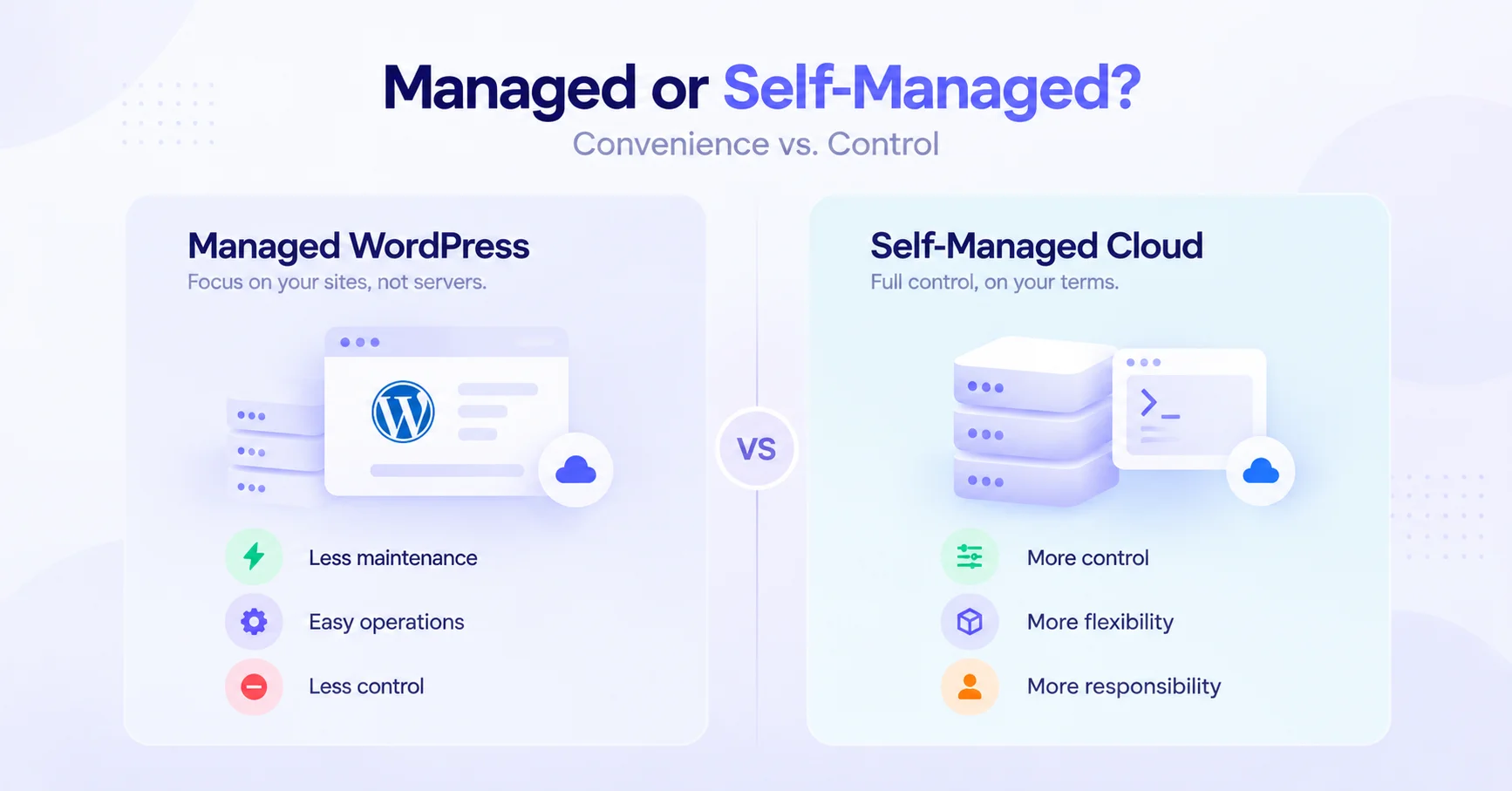
For agencies, the choice between managed WordPress hosting and self-managed cloud servers often comes down to convenience versus control. Managed hosting reduces infrastructure work, while self-managed cloud servers give agencies greater freedom to configure and operate their own environment.
| Managed WordPress Hosting | Self-Managed Cloud Servers | |
|---|---|---|
| Server management | Provider handles it | Agency handles it |
| Control | Limited–moderate | High |
| Maintenance | Lower | Higher |
| Flexibility | Moderate | High |
| Scaling | Usually easier | Depends on setup |
| Technical expertise | Lower | Higher |
| Infrastructure choice | Varies by provider | Usually broad |
| Agency workload | Lower | Higher |
Managed WordPress Hosting
Managed hosting is designed to remove much of the infrastructure burden from the agency. The provider typically handles server maintenance, platform configuration, security, backups, and other operational tasks.
This makes managed hosting attractive for agencies that want to focus primarily on building and maintaining client websites rather than managing servers.
The tradeoff is control. Agencies may have less freedom to customize the underlying server environment, choose specific infrastructure, or change low-level configurations.
Self-Managed Cloud Servers
With a self-managed cloud server, the agency has significantly more control over the infrastructure. It can choose the cloud provider, server specifications, operating system, software stack, caching configuration, and other components.
That flexibility comes with additional responsibility. The agency is responsible for server security, updates, backups, monitoring, troubleshooting, scaling, and ongoing maintenance.
For technically capable agencies, this can provide greater flexibility and potentially more control over infrastructure costs and architecture.
The Middle Ground: Managed Infrastructure + Greater Server Control
Agencies don't necessarily have to choose between fully managed hosting and managing everything themselves.
A third approach combines managed WordPress and server-management tools with greater infrastructure flexibility. This can allow agencies to choose their preferred cloud infrastructure while using a management platform to simplify deployment, security, backups, monitoring, and day-to-day WordPress operations.
This middle ground is particularly useful for agencies that want the operational convenience of managed hosting without giving up control over where and how their WordPress infrastructure runs. Our guide to managed hosting vs cloud hosting covers this tradeoff in more detail.
What Is BYOS WordPress Hosting?
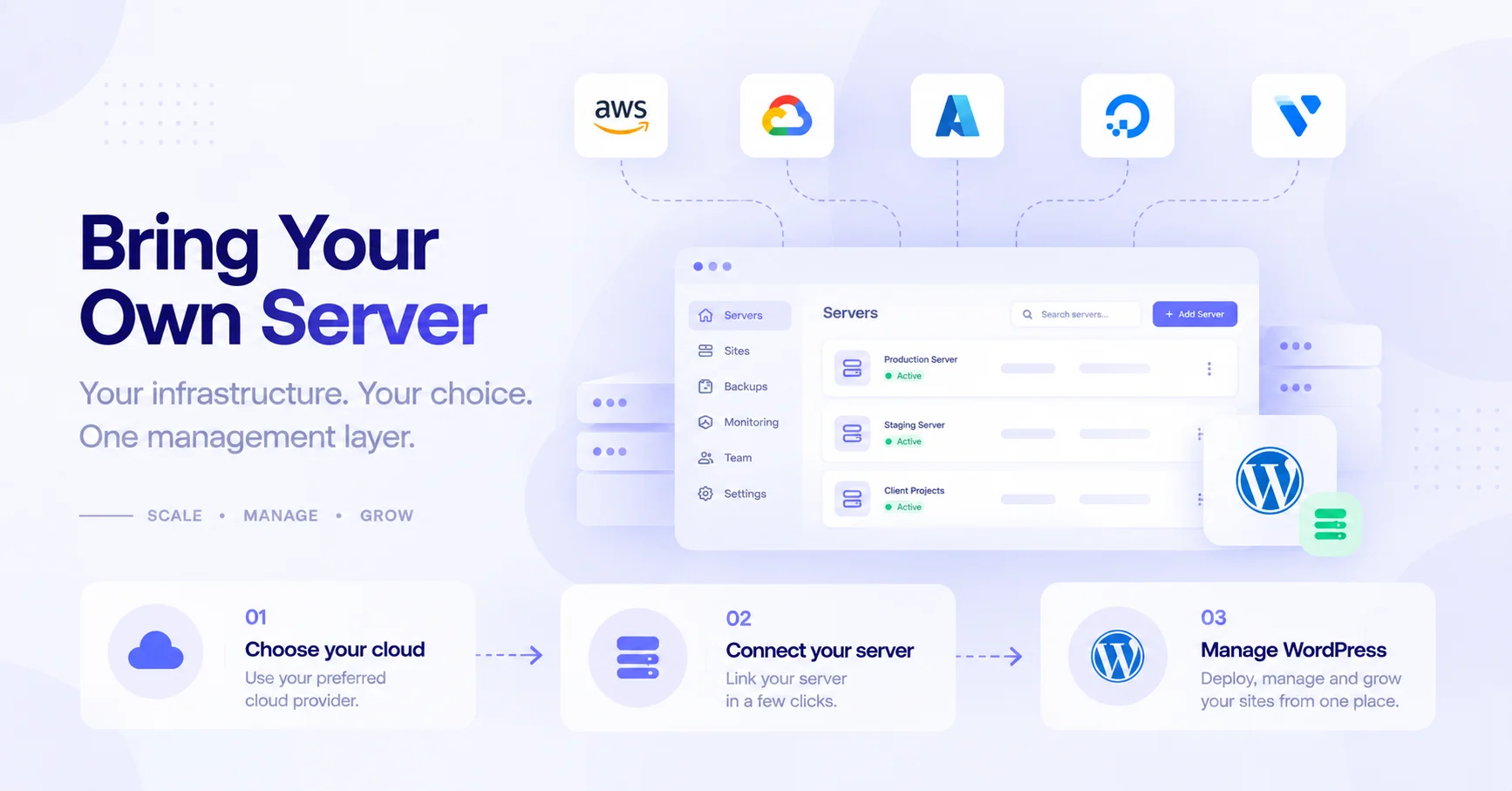
BYOS (Bring Your Own Server) WordPress hosting lets agencies connect and manage their own cloud server through a WordPress management platform. Instead of purchasing infrastructure directly from the hosting platform, agencies can use a server from a cloud provider they already prefer while using a separate management layer for WordPress and server operations.
Why Agencies May Want BYOS
BYOS can be useful when an agency wants more control over its infrastructure without taking on every aspect of WordPress management manually. It can also be valuable when an agency already has preferred cloud infrastructure or needs specific server configurations for different clients.
Cloud Provider Choice
With BYOS, agencies can choose infrastructure based on factors such as:
- Cloud provider
- Data-center location
- CPU and RAM
- Storage
- Network capacity
- Pricing
- Client requirements
This flexibility can be particularly useful when different client projects have different infrastructure needs.
Existing Infrastructure
Agencies that already operate cloud servers don't necessarily need to migrate everything to a new hosting provider. A BYOS platform can provide a management layer on top of existing infrastructure, depending on the platform's supported providers and server requirements.
Cost Control
BYOS can give agencies greater control over infrastructure spending because they can select the server size and cloud provider themselves. However, the cheapest server isn't always the cheapest overall solution—management time, backups, support, and scaling costs should also be considered.
Server Specifications
Agencies can select resources based on the workload of their client websites. A lightweight business site may require considerably fewer resources than a high-traffic WooCommerce store or a portfolio of multiple WordPress installations.
Migration Considerations
Before choosing BYOS, check:
- Whether your preferred cloud provider is supported
- Required server specifications
- Operating system and software requirements
- Migration tools
- Backup compatibility
- DNS and SSL requirements
- Downtime during migration
- Ongoing server maintenance responsibilities
Management Tradeoffs
BYOS provides more infrastructure flexibility, but that flexibility comes with additional responsibility. The agency still needs to understand its server resources, cloud provider, and infrastructure requirements, even if the management platform handles many routine WordPress and server operations.
BYOS is therefore best viewed as a middle ground: you choose the infrastructure, while the management platform simplifies the work of running WordPress on it.
How Much Does Agency WordPress Hosting Cost?
The cost of agency WordPress hosting depends on more than the advertised monthly hosting price. The number of websites, required server resources, backup requirements, management tools, support, and future scaling can all affect the total cost of operating a client portfolio.
When comparing providers, consider these costs together:
- Hosting cost: The base subscription or server cost.
- Number of sites: Some platforms charge per website, while others use plans based on site limits or server resources.
- Server resources: CPU, RAM, storage, and bandwidth requirements can increase costs as client workloads grow.
- Management overhead: A cheaper platform may require more manual work from your team.
- Backup costs: Additional backup storage, retention, or backup frequency may cost extra.
- Migration costs: Consider whether moving existing client sites requires paid migration services or significant agency time.
- Premium support: Enterprise or priority support can add to the total cost.
- Scaling costs: Account for how pricing changes when you need more resources, sites, or infrastructure.
Look at Cost Per Managed Website
For agencies, cost per managed website can be more useful than the advertised monthly price.
For example, a $100/month platform managing 50 sites costs $2 per site per month, while a $50/month platform limited to 10 sites costs $5 per site per month.
But price per site shouldn't be the only metric. A platform that saves your team hours of manual maintenance may provide substantially better value even if its subscription price is higher.
The best agency hosting is the one that balances infrastructure cost with the operational time, reliability, performance, and management capabilities your team needs.
Which Hosting Is Best for Agencies Managing 10, 50, or 100+ Sites?
The best hosting setup changes as an agency's portfolio grows. Managing 10 websites is primarily a workflow problem, while managing 100+ sites becomes an infrastructure and operational scalability problem.
Managing 10 WordPress Sites
At around 10 sites, agencies typically benefit most from simplicity and centralized management.
Prioritize:
- Central dashboard
- Reliable backups
- Staging environments
- Site cloning
- Simple client access
- Reasonable cost
- Basic monitoring
At this stage, you don't necessarily need the most advanced infrastructure. The priority is eliminating repetitive maintenance and establishing a consistent workflow across client websites.
Managing 50 WordPress Sites
At 50 sites, manual management becomes considerably more difficult. Automation and centralized operations become much more important.
Prioritize:
- Automated workflows
- One-click cloning
- Staging
- Centralized updates
- Monitoring
- Security
- Backups
- Resource isolation
- Efficient client management
At this scale, a small amount of repetitive work multiplied across dozens of websites can quickly become a high operational cost.
Managing 100+ WordPress Sites
Once an agency manages 100 or more websites, hosting should be evaluated as an infrastructure platform, not simply a place to host WordPress.
Prioritize:
- Infrastructure scalability
- Strong site isolation
- Automation
- Centralized management
- Comprehensive monitoring
- Disaster recovery
- Server-level control
- Cloud provider flexibility
- Reliable backup and restoration
- Efficient resource allocation
At this scale, agencies need to think about how the entire portfolio operates, including how sites are deployed, isolated, monitored, backed up, secured, and scaled.
The larger the agency becomes, the more important centralized automation and infrastructure control become. A platform that works perfectly for 10 sites may not be the most efficient choice for managing 100+ client websites.
Which WordPress Hosting Is Best for Agencies?
There is no single best WordPress host for every agency. The right choice depends on how much infrastructure control you need, how many sites you manage, and how much server management your team wants to handle.
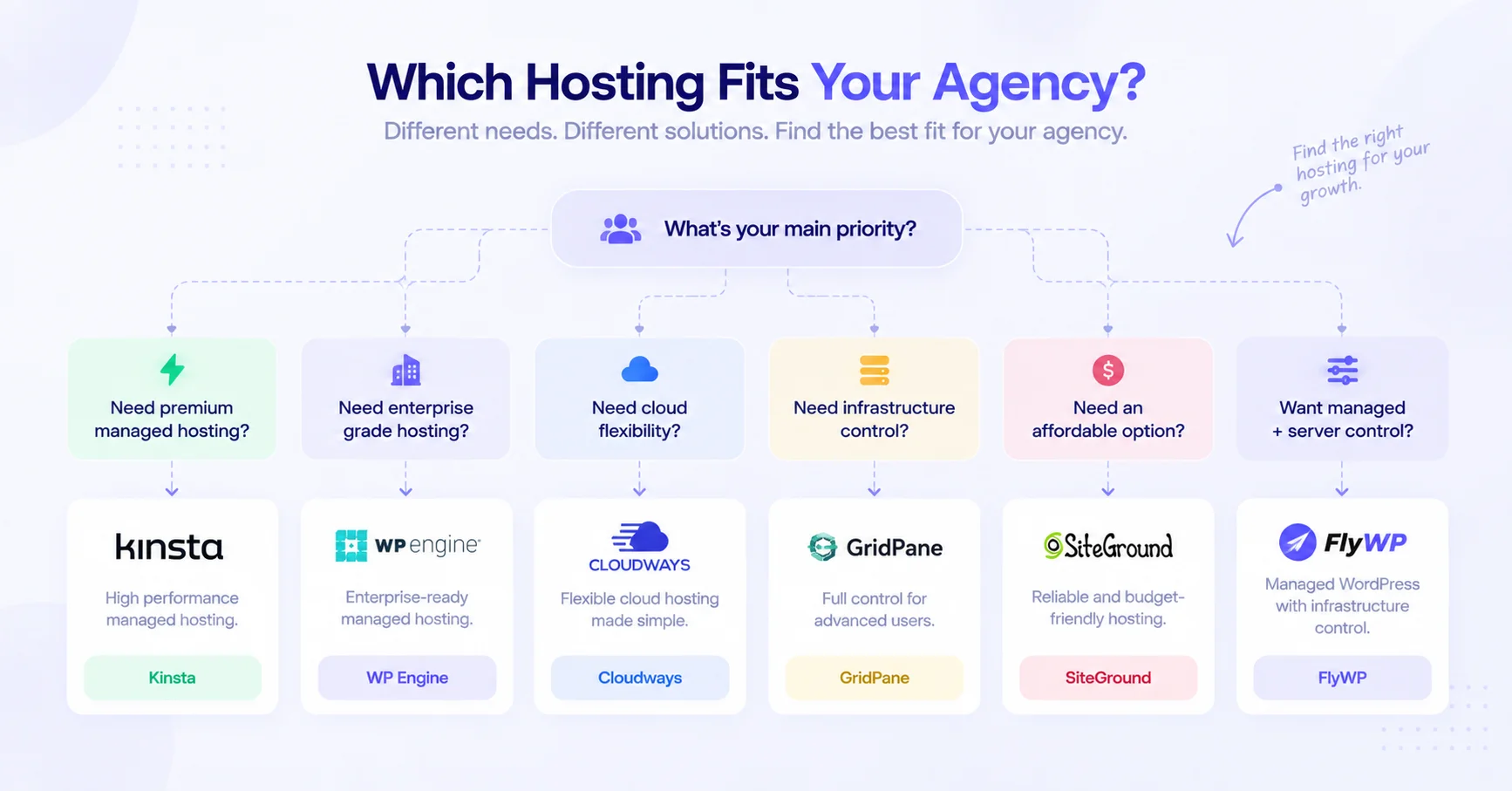
| If You Need... | Consider... |
|---|---|
| Managed WordPress operations + server control | FlyWP |
| Premium managed WordPress | Kinsta |
| Enterprise WordPress | WP Engine |
| Cloud provider flexibility | Cloudways |
| Agency-focused infrastructure | GridPane |
| Budget-friendly agency hosting | SiteGround |
How to Choose
- Choose FlyWP if you want managed WordPress operations while retaining greater control over your server infrastructure and cloud provider.
- Choose Kinsta if premium managed WordPress performance, security, and a polished agency experience are more important than infrastructure-level control.
- Choose WP Engine if you're an enterprise or larger agency looking for mature managed WordPress infrastructure, support, and enterprise features.
- Choose Cloudways if choosing between multiple cloud providers and managing infrastructure through a centralized platform is your priority.
- Choose GridPane if your agency is technically capable and wants deeper control over its own cloud infrastructure and WordPress stack.
- Choose SiteGround if keeping hosting costs relatively low while still getting agency-oriented management and collaboration features is the main priority.
For most agencies, the decision ultimately comes down to one question: do you want the hosting provider to control the infrastructure, or do you want your agency to have a greater role in controlling it? That distinction can be more important than comparing hosting plans by price alone.
How to Choose the Right WordPress Hosting for Your Agency
Choosing WordPress hosting for an agency should go beyond comparing monthly prices. The right platform should match your site portfolio, technical requirements, client workflow, security needs, and expected growth.
Use this checklist before choosing a hosting platform:
1. How Many Sites Do You Manage?
Start with your current portfolio and expected growth. A platform that works well for 5–10 websites may become inefficient when you're managing 50 or 100+ sites.
Look for centralized management, predictable pricing, bulk operations, and workflows that remain efficient as your portfolio grows.
2. Do You Need Server-Level Control?
Determine how much infrastructure control your team actually needs.
If your agency needs to configure servers, PHP versions, caching, databases, web servers, or other infrastructure components, choose a platform that provides sufficient server-level access. If your priority is minimizing technical work, a fully managed platform may be more appropriate.
3. Do You Need BYOS?
BYOS (Bring Your Own Server) can be valuable if you already have preferred cloud infrastructure or want to choose your own provider, server location, and resource configuration.
If infrastructure flexibility is important, check whether the platform supports your preferred cloud providers and server setup.
4. How Important Is Site Isolation?
Site isolation becomes increasingly important as your client portfolio grows. Isolated environments can help prevent problems on one website from affecting other sites on the same infrastructure.
For agencies managing many client websites, look for technologies and configurations that provide strong separation between sites.
5. Do You Need Staging and Cloning?
Staging allows your team to test updates and changes before deploying them to production. Cloning can significantly reduce the time required to create new client environments.
If your agency launches websites frequently, one-click staging and cloning can save substantial operational time.
6. How Much Automation Do You Need?
Consider how many repetitive tasks your team performs every week.
Useful automation can include:
- Backups
- Updates
- Deployments
- SSL management
- Site provisioning
- Monitoring
- Security tasks
- Cache management
The larger your portfolio, the more valuable automation becomes.
7. What Security Controls Are Required?
Evaluate the security capabilities included with the platform rather than assuming that "managed hosting" automatically means comprehensive security.
Consider features such as:
- Firewalls
- WAF protection
- DDoS protection
- Malware scanning
- SSL management
- SSH key management
- Site isolation
- Automated backups
- Access controls
Your requirements may also vary depending on the type of client websites you manage.
8. How Much Traffic Do Your Sites Receive?
Look beyond the number of websites and consider their workloads.
A portfolio of 50 low-traffic business websites can have very different infrastructure requirements from 10 high-traffic WooCommerce stores.
Evaluate:
- CPU and RAM
- PHP performance
- Database performance
- Page caching
- Object caching such as Redis
- CDN support
- Storage
- Traffic spikes
- Resource scaling
9. Do Clients Need Access?
If clients need access to their websites, check how the hosting platform handles users, roles, permissions, collaborators, and white-label workflows.
Agencies should be able to give clients appropriate access without exposing server-level controls or other client websites.
10. How Quickly Do You Need to Scale?
Think beyond your current requirements. If you're growing from 10 to 50 or 100+ websites, determine how easily the platform can scale with you.
Look for flexible resources, infrastructure options, monitoring, automation, and pricing that remains practical as your portfolio expands.
The best hosting platform for your agency is the one that fits your operational model—not necessarily the one with the lowest monthly price or the longest feature list.
Frequently Asked Questions
What is the best managed WordPress hosting for agencies?
The best managed WordPress hosting depends on an agency's priorities. FlyWP is a strong option for agencies that want managed WordPress operations with greater server and infrastructure control, while platforms such as Kinsta and WP Engine are better suited to agencies prioritizing premium or enterprise-focused managed WordPress services.
What should agencies look for in WordPress hosting?
Agencies should prioritize centralized management, performance, security, backups, staging, cloning, automation, monitoring, client access, scalability, and appropriate server control. The importance of each feature depends on the agency's site count, technical expertise, and client requirements.
Which WordPress hosting is best for managing multiple client websites?
The best option is a platform that centralizes routine WordPress and infrastructure management across multiple sites. Look for features such as centralized dashboards, cloning, staging, backups, monitoring, security controls, and efficient client access.
What is the best WordPress hosting for 50+ websites?
For 50+ websites, prioritize automation, centralized management, site isolation, monitoring, backups, and scalable infrastructure over basic hosting price. At this scale, reducing repetitive operational work can be more valuable than choosing the cheapest hosting plan.
Do agencies need managed WordPress hosting?
Agencies don't necessarily need managed WordPress hosting, but it can significantly reduce operational workload. Managed hosting can handle infrastructure maintenance and routine server operations, allowing the agency to focus more on client websites. Technically capable agencies may instead prefer self-managed infrastructure or a management platform with greater server control.
Which WordPress hosting offers the most server control?
Self-managed cloud infrastructure generally provides the most server control, while infrastructure-oriented WordPress platforms can provide a middle ground. Agencies should compare root access, server configuration, cloud provider choice, web server options, PHP/database controls, and caching capabilities before choosing.
What is BYOS WordPress hosting?
BYOS (Bring Your Own Server) WordPress hosting lets agencies connect their own cloud server to a WordPress management platform. This allows agencies to choose their preferred infrastructure while using the management platform to simplify WordPress deployment, security, backups, monitoring, and other operational tasks.
Is cloud hosting better than managed WordPress hosting for agencies?
Neither is universally better; it depends on how much control and management responsibility the agency wants. Cloud hosting can provide greater infrastructure flexibility and scalability, while managed WordPress hosting typically reduces server-management work. A BYOS platform can provide a middle ground between the two approaches.
How much does agency WordPress hosting cost?
Agency WordPress hosting costs vary based on the number of sites, server resources, backups, support, management features, and scaling requirements. Agencies should calculate the total cost of managing their portfolio and compare the resulting cost per managed website rather than relying only on the advertised monthly price.
What features help agencies manage multiple WordPress sites?
Centralized management, cloning, staging, automated backups, updates, monitoring, security, site isolation, client access, and scalable infrastructure are among the most useful features. These capabilities reduce repetitive work and help agencies maintain consistent workflows across larger client portfolios.
Final Verdict
There is no single best WordPress hosting platform for every agency. The right choice depends on the agency's site portfolio, technical expertise, infrastructure requirements, and desired level of management.
- For agencies prioritizing premium managed WordPress performance, security, and a polished client experience → choose Kinsta.
- For agencies prioritizing enterprise-grade WordPress infrastructure, support, and advanced managed services → choose WP Engine.
- For agencies prioritizing cloud provider flexibility and managed cloud hosting → choose Cloudways.
- For agencies prioritizing agency-focused infrastructure and deeper control over their WordPress stack → choose GridPane.
- For agencies prioritizing affordability and straightforward multi-site management → choose SiteGround.
- For agencies wanting managed WordPress operations + greater infrastructure and server control → choose FlyWP.
For most growing agencies, the key decision isn't simply which host is fastest or cheapest. It's whether the platform can reduce the operational work involved in managing an increasing number of client websites while giving the agency enough control to handle more demanding workloads.
If your agency wants the convenience of managed WordPress without completely giving up control over the underlying infrastructure, FlyWP provides a practical middle ground – combining centralized WordPress management with Docker-powered infrastructure and BYOS flexibility. Try FlyWP free and see how it fits your agency's workflow.