FlySecurity Pro (Powered by Patchstack)
Protect your WordPress sites with FlySecurity Pro, powered by Patchstack. FlySecurity Pro provides real-time vulnerability protection through Patchstack’s industry-leading threat intelligence and virtual patching technology, helping keep your websites secure against known exploits before updates are available.
Unlike traditional vulnerability scanners that only notify you about security issues, FlySecurity Pro actively protects your sites by applying virtual patches for vulnerable plugins, themes, and WordPress core.
Features
Section titled “Features”- Real-time vulnerability monitoring
- Automatic virtual patching
- Protection against known WordPress exploits
- Continuous security intelligence updates
- Centralized management inside FlyWP
- 30-day free trial for every protected site
- $2.00 per protected site per month after the trial
Getting Started
Section titled “Getting Started”Enable FlySecurity Pro
Section titled “Enable FlySecurity Pro”You can activate FlySecurity Pro from any WordPress site inside FlyWP.
- Navigate to Sites → Your Site → Security
- Under Security click on Vulnerabilities.
- Click Enable Protection.
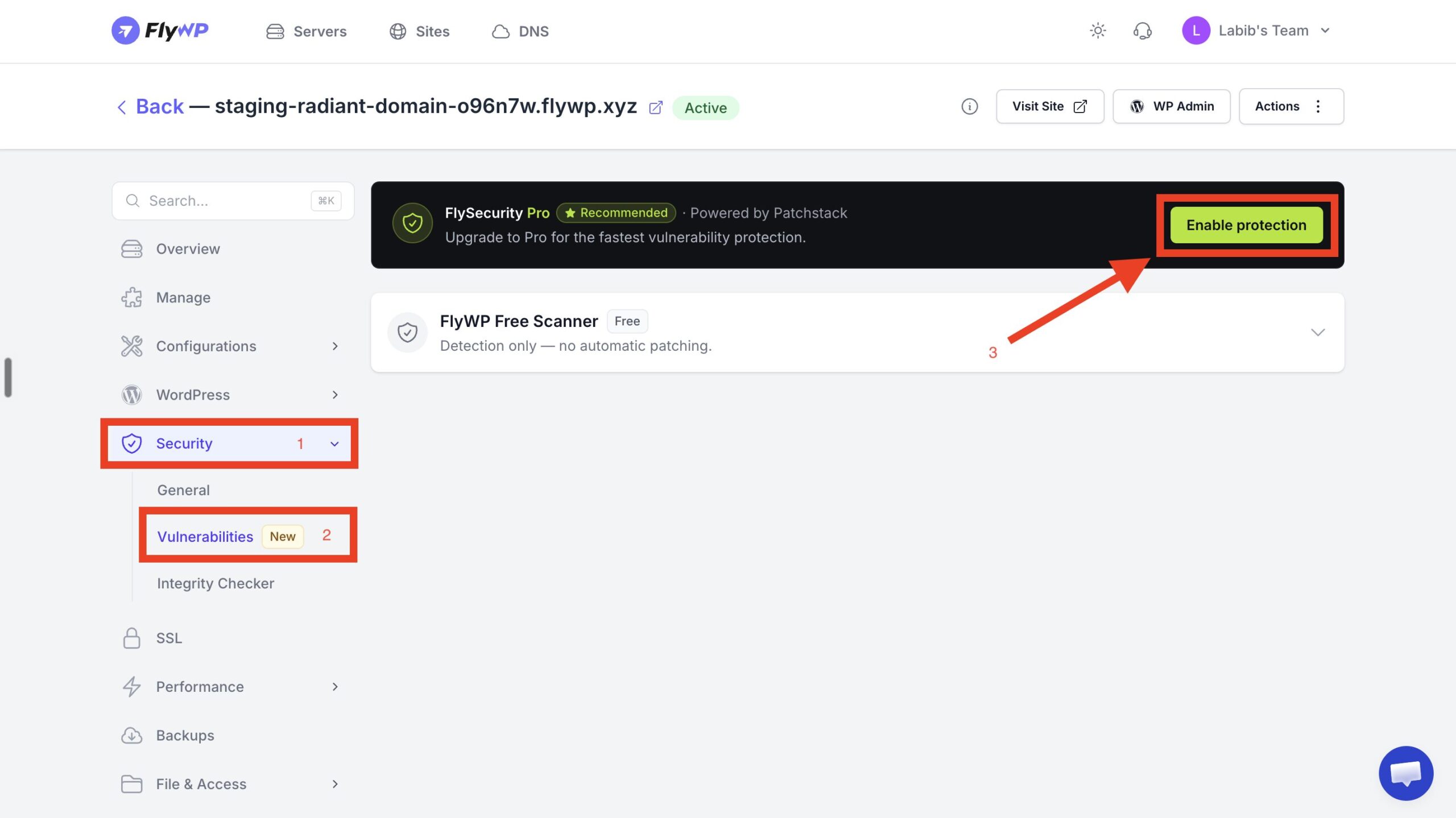
Once enabled, FlyWP automatically provisions your website with Patchstack and activates protection.
After provisioning completes, you’ll see a confirmation dialog showing the protection status.
Protection is typically enabled within a few seconds.
Protect Multiple Sites
Section titled “Protect Multiple Sites”FlySecurity Pro can also be managed at the team level.
Navigate to:
Team Settings → Add-ons → FlySecurity Pro
Click Protect Sites to select one or more websites.
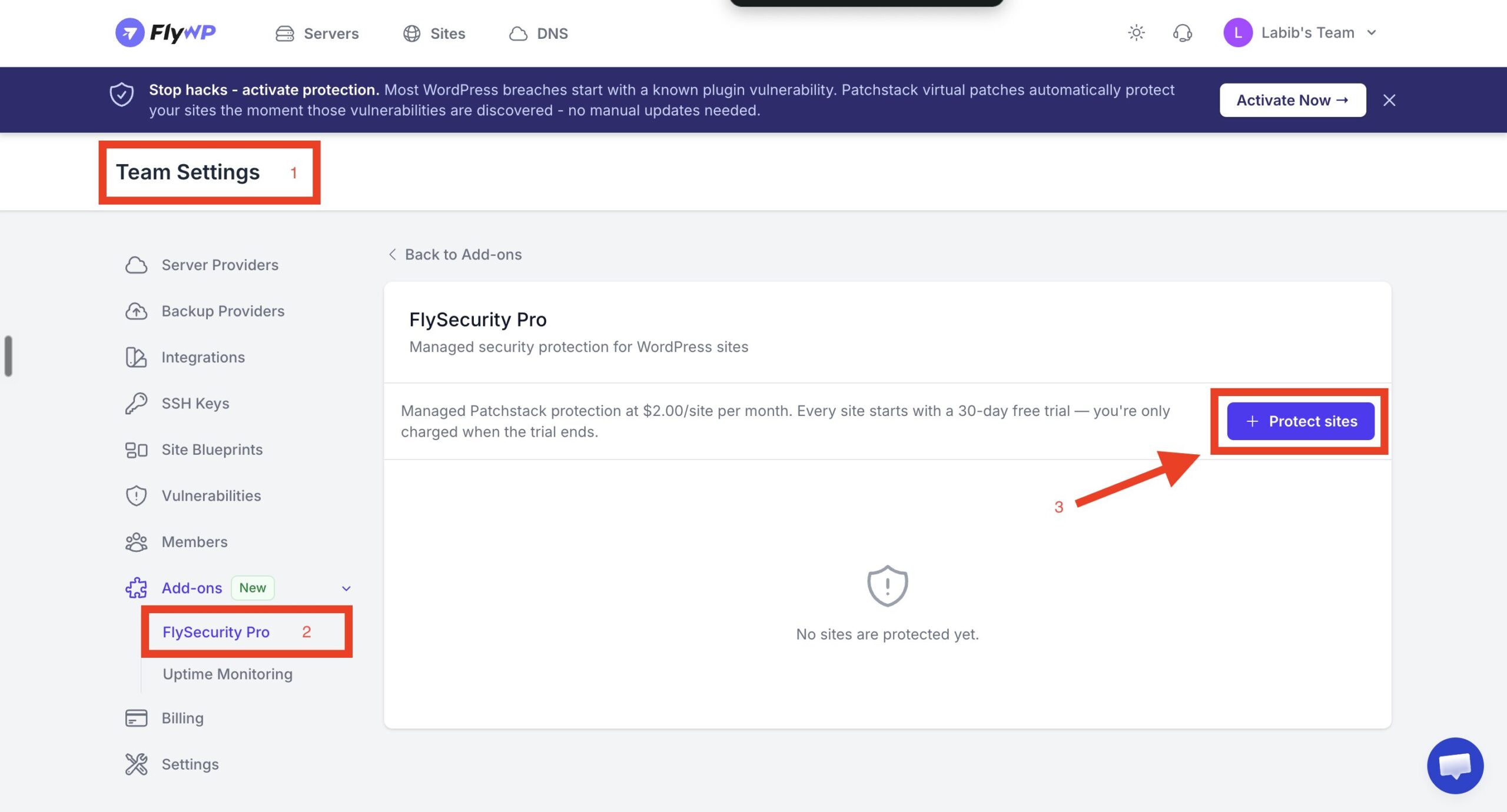
The dialog displays:
- Available WordPress sites
- Current vulnerability count
- Monthly pricing
- Trial eligibility
Select the desired sites and click Start Free Trial.
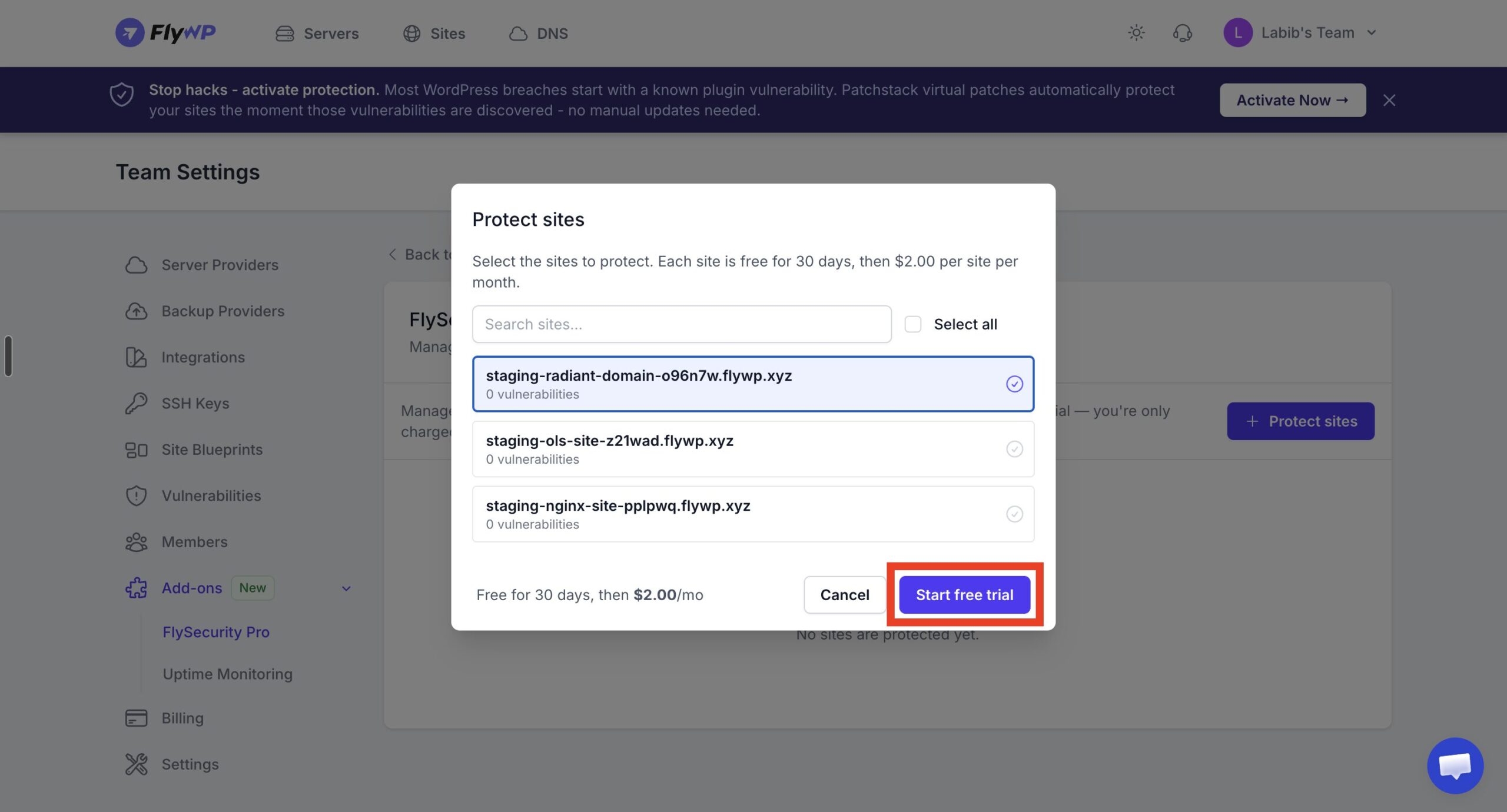
Each selected site immediately begins its own 30-day free trial.
Managing Protected Sites
Section titled “Managing Protected Sites”The FlySecurity Pro dashboard lists every protected website along with:
| Field | Description |
|---|---|
| Site | Protected WordPress website |
| Status | Current protection status |
| Monthly Cost | Billing after the free trial |
| Actions | Disable protection |
You can add or remove protected sites at any time.
Disabling protection stops future billing after the current billing period and removes managed protection from the selected website.
Security Dashboard
Section titled “Security Dashboard”Once activated, the Security → Vulnerabilities page displays a dedicated FlySecurity Pro dashboard.
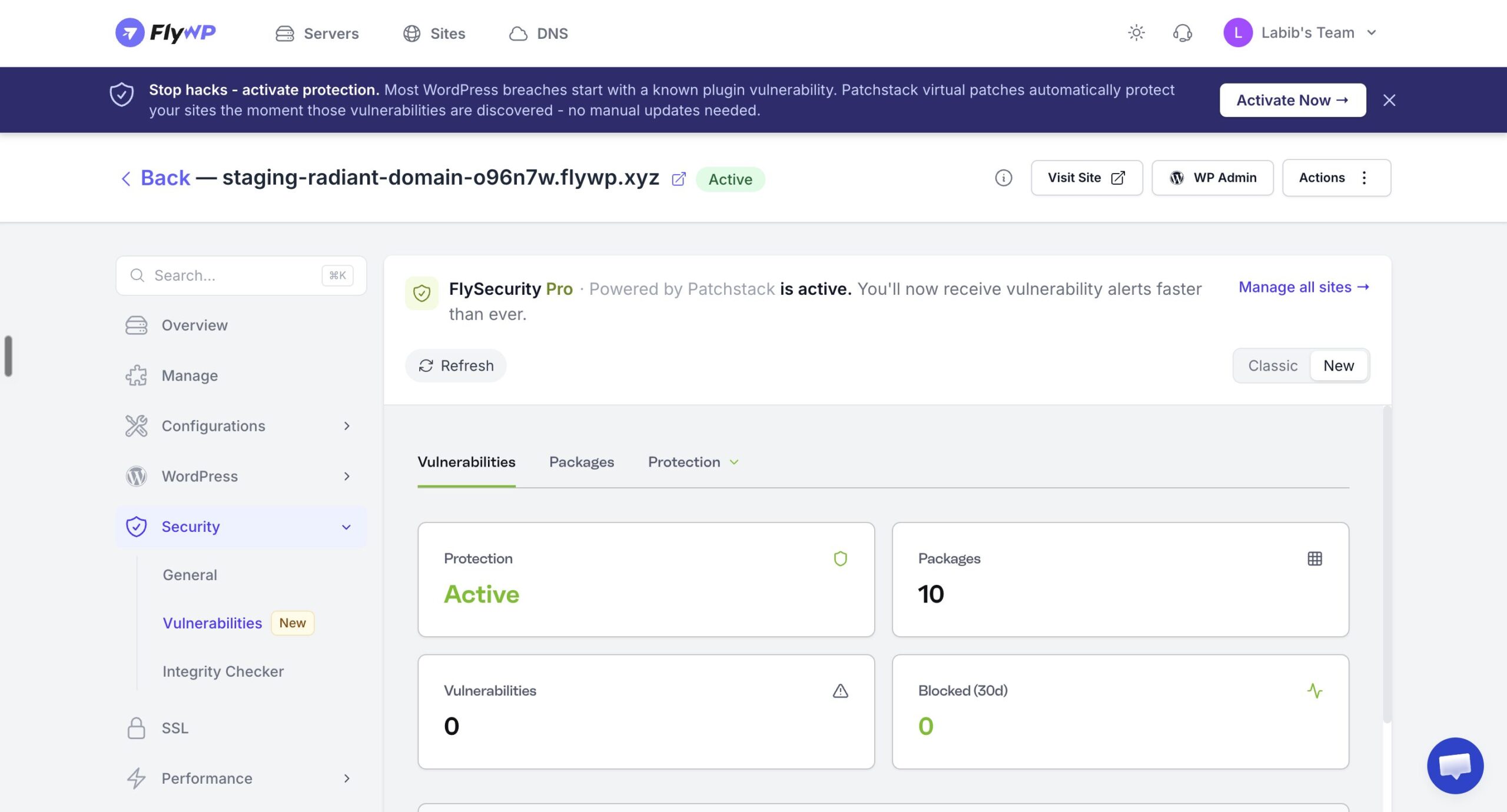
The dashboard includes:
Protection Status
Section titled “Protection Status”Displays whether the website is currently protected.
Possible statuses include:
- Active
- Provisioning
- Disabled
Vulnerabilities
Section titled “Vulnerabilities”Shows the total number of known vulnerabilities detected on the website.
Vulnerabilities are categorized by severity and include information such as:
- Affected plugin or theme
- Installed version
- Fixed version
- Severity
- CVSS score
- Exploit availability
Packages
Section titled “Packages”Displays the total number of monitored WordPress components, including:
- WordPress Core
- Plugins
- Themes
Blocked Attacks (30 Days)
Section titled “Blocked Attacks (30 Days)”Shows the number of exploit attempts blocked by Patchstack during the last 30 days through virtual patching.
Virtual Patching
Section titled “Virtual Patching”Virtual patching is the core feature of FlySecurity Pro.
Instead of waiting for plugin developers to release updates—or requiring you to update immediately—Patchstack automatically blocks known exploit attempts targeting vulnerable software.
Benefits include:
- Immediate protection
- Reduced risk from zero-day vulnerabilities
- No changes to your website code
- Minimal performance impact
Virtual patches are continuously updated using Patchstack’s threat intelligence network.
Vulnerability Detection
Section titled “Vulnerability Detection”FlySecurity Pro continuously monitors:
- WordPress Core
- Installed Plugins
- Installed Themes
Whenever a new vulnerability is disclosed, FlySecurity Pro automatically:
- Detects whether your site is affected.
- Applies a virtual patch when available.
- Displays the vulnerability in the dashboard.
- Keeps monitoring until the software is updated.
Billing
Section titled “Billing”Every protected site includes:
- 30-day free trial
- $2.00 USD per site/month after the trial
Billing begins only after the trial period expires.
You can protect different sites independently, allowing each site to maintain its own billing cycle.
Frequently Asked Questions
Section titled “Frequently Asked Questions”Does FlySecurity Pro replace plugin updates?
No. Virtual patching provides protection while you prepare updates, but you should still keep WordPress core, plugins, and themes updated whenever possible.
Does FlySecurity Pro slow down my website?
No. Virtual patching is designed to provide protection with minimal performance impact.
Can I disable protection?
Yes. You can disable FlySecurity Pro for any protected site from Team Settings → Add-ons → FlySecurity Pro.
Can I protect only specific websites?
Yes. Protection is enabled per website, allowing you to choose exactly which sites are covered.
What happens when my 30-day trial ends?
Your protected site will automatically transition to the paid plan at $2 USD per site per month unless you disable protection before the trial expires.
Summary
Section titled “Summary”FlySecurity Pro integrates Patchstack’s enterprise-grade security platform directly into FlyWP, providing continuous vulnerability monitoring and automatic virtual patching for WordPress sites. With one-click activation, centralized management, and per-site billing, it offers an easy way to strengthen your websites against known vulnerabilities while maintaining full control over which sites are protected.
Still stuck? How can we help?
View as Markdown